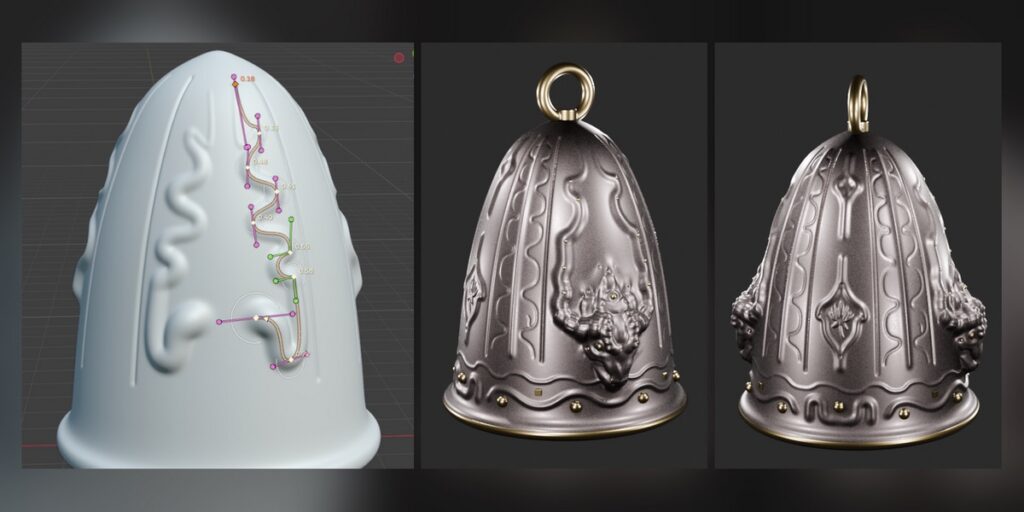
Mark Kingsnorth, creator of the Quad Maker retopology add-on, has released Curve Sculpt 3D for Blender 5.2 and newer. Blender’s built-in Curve Stroke method keeps curves flat on the screen. The add-on instead lets artists draw a path that wraps around a mesh and stays attached to its surface, so they can rotate the view and edit the curve from any angle.
To create a stroke, choose a built-in sculpt brush and draw a curve on the mesh. Adjust the curve’s control points and pressure, then press Enter to apply the brush along the path. The curve remains available afterward. An artist shaping a panel line, for example, can reuse the same path to try a different brush or strength without redrawing it. Other uses include grooves, raised seams and rows of bumps.
Curve Sculpt 3D is still in early development. As with ordinary Blender sculpting, performance depends on the brush, the complexity of the mesh and the length of the stroke.